










HoneyBook vs. QuickBooks: Which is best for small service-based businesses?
Start a Trial
Learn how HoneyBook vs. QuickBooks compare and how you should use each platform.
HoneyBook and QuickBooks share several key features, including invoicing, payment processing, and financial management. But the real difference lies in their focus: HoneyBook excels as an all-in-one client management platform, while QuickBooks specializes in small business accounting.
Picking the right business management tool doesn’t have to be overwhelming. Let’s break down how HoneyBook and QuickBooks compare—and explore how they measure up against other top QuickBooks alternatives.
And the best part? You don’t have to choose just one: HoneyBook integrates seamlessly with QuickBooks Online, offering the best of both worlds.
Key takeaways
- QuickBooks is a popular tool for accounting and business management, but it’s not your only option.
- HoneyBook is an all-in-one tool that offers invoicing, payment processing, financial planning, and reporting for small business—plus, a full suite of client management tools.
- To choose the best option for your business, think about your financial goals and the features you need to achieve them.
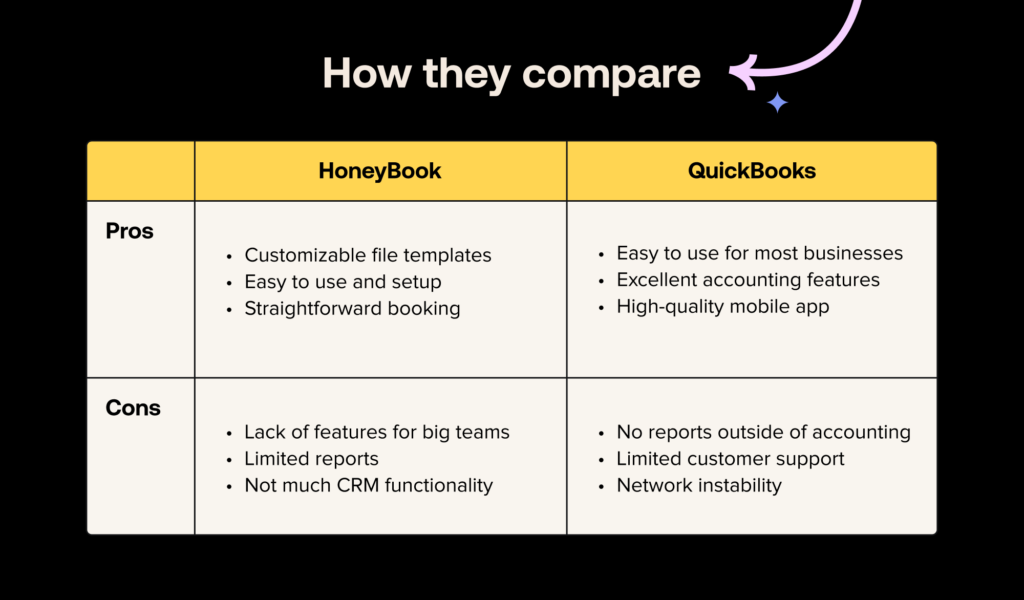
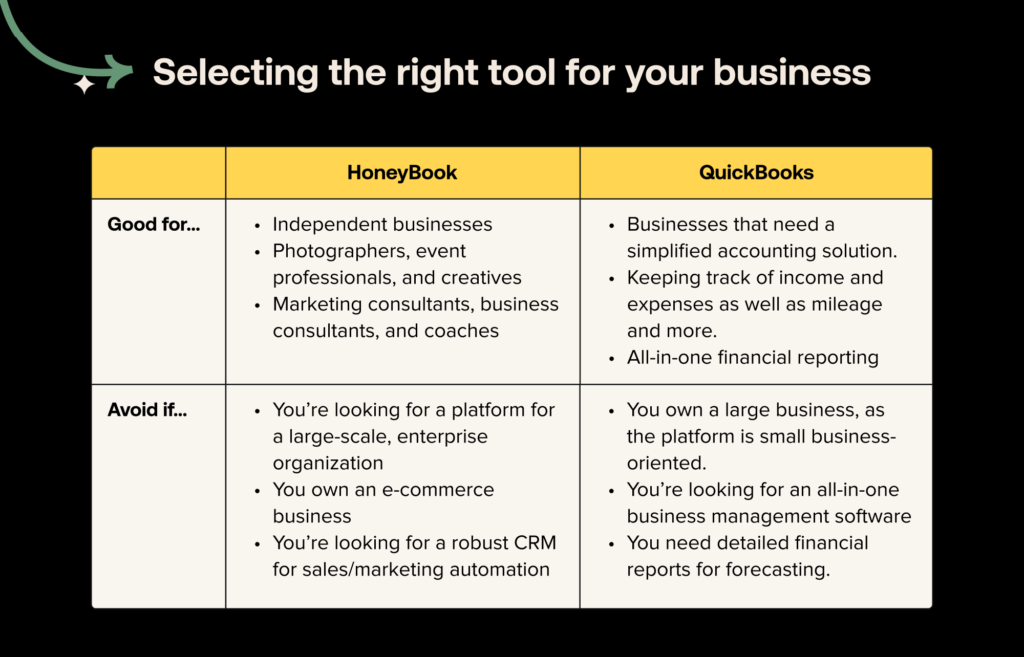
QuickBooks alternatives compared
Here’s how QuickBooks and HoneyBook stack up at a glance. Compare the following key features to see what’s right for your business needs.

QuickBooks overview
QuickBooks is primarily accounting software, and its financial management features are where it truly excels. There are several versions of QuickBooks, including QuickBooks Online, QuickBooks Desktop, and a limited free version to suit different business needs.
You can use QuickBooks and HoneyBook together if you need both project management and bookkeeping features.
Accounting and financial reporting
QuickBooks has extensive accounting features, including double entry accounting, profit and loss reporting, expense tracking, cash flow visibility, tax support, and more.
Depending on your plan, you can also access advanced features such as inventory management and payroll processing.
Invoicing and payment tracking
With QuickBooks, create and send invoices, track payments, and set up automated billing for recurring clients. QuickBooks’ invoicing features focus on processing transactions, rather than managing the entire client lifecycle.
Integrations and ecosystem
QuickBooks is part of the Intuit ecosystem, which means it integrates naturally with TurboTax and Mailchimp. QuickBooks also offers hundreds of integrations with customer relationship management (CRM) systems, payment processors, communication tools, and ecommerce platforms.
QuickBooks
Invoicing is one of the areas where QuickBooks Online shines.
The platform offers basic invoice templates that you can use on an as-is basis, or you can customize them to fit your needs. If you decide to customize your invoices, you can change themes, colors, fonts, and more to align your invoices with your brand image. And your customers can pay your invoices as soon as they receive them with built-in online payments.
Not to mention, QuickBooks offers all the invoicing features you might need. You can set up recurring invoices for customers you charge regularly, take advantage of automatic invoice reminders, and benefit from milestone payments and other custom payment.

Schedule clients easily with HoneyBook
Skip the back-and-forth: Schedule meetings, sessions, consultations, and more in one click.
Get startedHoneyBook overview
HoneyBook helps small businesses manage the entire client lifecycle from inquiry to payment in one centralized platform. Unlike QuickBooks, which focuses on accounting, HoneyBook emphasizes broader business management and client communication.
While it’s not a direct replacement for QuickBooks, HoneyBook does include some overlapping payment features, making it a flexible complement for small business operations.
Client management and end-to-end workflows
HoneyBook helps you manage clients in a user-friendly CRM. You can process incoming leads, onboard new clients, schedule meetings, and handle payments. Because everything’s in one place, there’s no need to switch back and forth between platforms while working.
Integrated contracts, proposals, and payments
Unlike traditional accounting software, HoneyBook offers templates for contracts, proposals, and invoices. Clients can electronically sign documents and process payments all in the same platform. HoneyBook helps keep all of these key documents organized so you can revisit them at any time.

Connect every tool in your workflow.
Link your calendar, email, and apps to HoneyBook so everything stays in sync, and your process runs smoothly.
Explore HoneyBook integrationsAutomations for invoicing and follow-ups
With HoneyBook, you can set up recurring workflow automations for repetitive tasks, such as client follow-ups and repeat invoices. These automations keep your business running smoothly and free up valuable time in your workday.
Customizable templates
HoneyBook has an extensive library of templates for invoices, proposals, contracts, and more, with options tailored to a variety of industries and use cases. Invoice templates help bookkeepers work more efficiently—plus, they look sleek and professional.
QuickBooks
FreshBooks overview
FreshBooks is a popular QuickBooks software alternative that’s built for freelancers and small businesses.
Simple, client-friendly invoicing and billing
FreshBooks has an invoice generator with customizable templates. You can also set up automated billing and payments for recurring clients. It’s simple and user-friendly, so there’s no need to be an expert accountant.
Time tracking and project collaboration tools
If you work hourly, you can use FreshBooks’ time tracking feature to calculate billable hours. You can also generate proposals and share files directly in FreshBooks for faster collaboration.
Expense capture and reporting made easy
FreshBooks helps keep receipts organized and categorize your expenses so you’re prepared for tax season. FreshBooks also helps monitor cash flow and generate financial reports.

Zoho Books overview
Zoho Books is another software similar to QuickBooks with accessible accounting and payment processing features. This cloud-based software is part of the broader Zoho business management platform.
Comprehensive accounting across all platforms
Zoho Books’ extensive range of accounting features make it one of the top QuickBooks competitors. It offers features like bank reconciliation, tax compliance tools, expense management, inventory tracking, and more.
Customizable automation and workflows
Zoho Books helps create automated workflows tailored to your business needs, including automated invoicing and payment reminders. You can also automate approval processes, task assignments, and client notifications to save time and reduce manual work.
Deep integration with Zoho ecosystem
Zoho Books is built to integrate seamlessly with other Zoho products, including Zoho CRM. This makes it a convenient choice if you’re already using other Zoho tools, streamlining data flow across your business.

Contracts built for business owners—no law degree needed
Skip the confusion, and get customizable, lawyer-approved contracts with HoneyBook
Create your contractWhat to consider when choosing for your business
The best accounting software for your business depends on factors like your business model and the size of your team.
Here’s what to consider when evaluating accounting software alternatives to QuickBooks:
- Getting paid: Look for tools that help generate invoices and process payments without requiring technical knowledge.
- Tracking finances: User-friendly bookkeeping and financial reporting tools help you stay on top of your budget.
- Business management features: Integrated contracts, proposals, and client communication features help manage everything in one place.
Choosing software that aligns with your workflow and business needs supports smoother operations and long-term growth.

Centralize your client management
Capture leads, sell services, manage projects, and nurture client relationships from one platform. All that and more with HoneyBook.
Get startedFAQs
What’s the simplest bookkeeping software?
HoneyBook combines bookkeeping features with business management tools in one simple, user-friendly platform. If you need free accounting software, Wave Accounting is another good option that offers no-frills income and expense tracking.
Is QuickBooks for small businesses worth it?
QuickBooks is worth it for small businesses that have complex inventory management needs or require complex tech stack integrations. While it’s considered an industry standard, many small businesses find that it has more features than they need. In this situation, you can choose a client-focused QuickBooks alternative for small business, like HoneyBook.
What’s a good alternative to QuickBooks?
HoneyBook is a top QuickBooks alternative for service-based businesses. Rather than using a separate CRM and accounting software, HoneyBook offers the best of both worlds with client communication, contracts, payment tracking, and more all in one platform.
What software do most accountants use?
Accountants often use tools like HoneyBook, QuickBooks, and Xero to manage their finances. These cloud-based tools make real-time collaboration simple, providing transparent reporting and easy data exports for tax season.

Brittany is on the UX Research team at HoneyBook and conducts unbiased competitor research to better understand how HoneyBook fits into the landscape of platforms for small business owners. She enjoys speaking directly with HoneyBook users to understand more about their businesses and pain points. In her downtime, she loves reading and spending time outside around the Detroit area.





