







How to build a reliable process map for your business, plus templates
Start a Trial

No matter your business’s niche, you probably have repeatable processes you reuse with each client. Perhaps you always send out a payment reminder one week before a due date or request feedback three days after a project’s completion.
Process mapping helps you document and refine those workflows. A process map lays out your order of operations for every project, so you stay organized and get consistent results. You can also use the approach to pinpoint what’s working and what’s not as your business grows.
Here’s how to create a process map and can apply automations for better efficiency.
What is a process map useful for?
A process map is a visual diagram that illustrates how you progress through each step in your workflow. These maps can help improve your business by spelling out what happens when.
If you feel like your workflows aren’t as efficient as they could be, process flow mapping can help you capture inefficiencies, bottlenecks, or repetitive tasks that are taking up too much time. With this information, you can adjust your approaches to work more efficiently.
Process mapping also helps with workflow consistency. A documented process map encourages you to complete tasks in the same order every time, which may reduce errors.
These flowcharts can be particularly useful if you’re working with a small team. The map clarifies who’s responsible for each step and when team members should hand off responsibilities to reduce confusion.

Stop starting from scratch every time.
Build reusable docs for every client stage and send polished, on-brand materials in seconds, not hours.
Explore templatesStep-by-step guide to creating your own process map
Process maps are a flexible tool that you can tailor to your business structure and service offerings. They work for many different types of businesses and are a helpful tool as you grow and scale.
Here’s a step-by-step breakdown of how to create a process map for your clientflow:
- Define scope: First, decide what you want to map. You might want to create one comprehensive map that covers your entire operations or more granular processes like billing, sales, or onboarding.
- Gather information: Compile all your internal documents and communications related to the task, so you can reference them as you’re building your map. Take note of who’s involved and which tools they use.
- List steps: From there, write out the steps of your process in order. Include clear and specific details.
- Create the map: The easiest way to create a map is by using a process map template rather than creating the map from scratch. Organize each step of the workflow into a clear diagram or flowchart.
- Review and refine: Once you have the map in place, review it to see what steps are working and if there’s anywhere you can improve. For example, you may be able to combine, remove, or reorder steps to reduce bottlenecks.
After completing your process map, review it periodically to make sure it’s still accurate, and identify new opportunities for improvement. Your processes might evolve as you expand your services.
How to use templates to make a process map
Templates make it easy to build a business process map, even if you don’t have graphic design experience. HoneyBook has built-in process mapping with templates tailored to your business, so you don’t have to start from scratch.
To create a process map in HoneyBook, start by taking the process mapping quiz. HoneyBook then asks about your day-to-day workflows and automatically creates a map based on your answers. You can take the quiz as many times as you want to get a map that’s right for your business.
From there, you can click on each step in the process map to find corresponding HoneyBook features. You can also download a copy to share with your team.
Here’s an example of process mapping in HoneyBook:
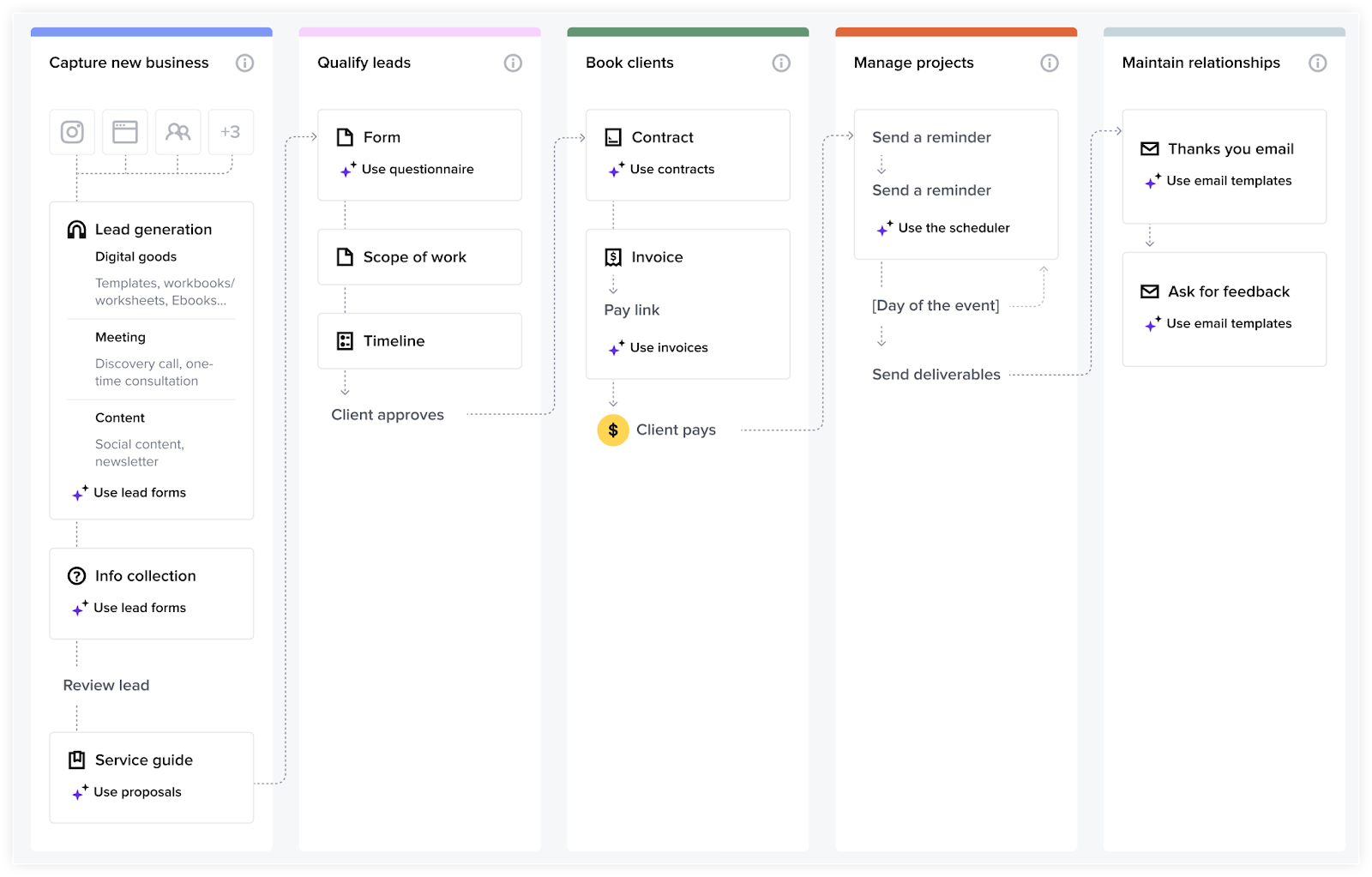
Source: HoneyBook
Alt text: Example of a process map in HoneyBook
How to improve an existing process map
After building your process map, it’s time to review and adjust it to improve your business’s operations.
Start by identifying any steps you can combine or eliminate. They might be repetitive, confusing, or not useful.
Next, identify any roadblocks or bottlenecks that are slowing your team down. For example, you might find yourself consistently waiting for client approval at the same point in every project. In this case, you might move client review sooner so you don’t get stuck.
You might also observe that leads tend to go dark at a specific point in your sales funnel. With this information, you can adjust your marketing tactics, proposals, or onboarding programs to keep potential clients engaged.
If you have employees, you can involve them in your process mapping. They may have unique ideas for cross-functional process improvement that you’ve overlooked.
When processes change, revisit and adjust your map so it matches your real-world operations. Having an updated process map makes it easier to onboard new employees and stay organized.
How to set up business process automation
After creating your process map, you can use it to set up workflow automations. Automations keep projects moving forward by handling repetitive tasks for you. This is particularly useful when scaling your business, as it helps you work faster and take on more clients without extra manual effort.
Once you’ve built your process map in HoneyBook, you can use it to build automations in your client management system. For example, you can use automations to schedule meetings, send out questionnaires, and send invoice reminders to clients at the appropriate points in your workflow.
You can set contextual triggers and logic rules for every HoneyBook automation, so each action happens at the right moment. You can also integrate HoneyBook with other software you use in your business processes and automate actions across platforms.
How HoneyBook helps you improve your business processes
The purpose of a process map is to reinforce efficient workflows. This diagram helps you standardize workflows, so you can repeat them for every project. You can visualize what’s working and what’s not to refine your approach as your business grows.
HoneyBook helps you build an interactive process map, then use it to automate your entire workflow. Create a map using HoneyBook’s process mapping quiz and templates, then set up custom automations to handle each administrative task for you.
As an all-in-one business management platform, HoneyBook supports the entire client workflow. Create branded documents, schedule meetings, and manage client communications, all in one place. AI features help you work more efficiently to deliver better results for your clients.
Start a free trial of HoneyBook today to start mapping your business processes.
FAQs
How can I use HoneyBook templates for process map building?
You can build an interactive process map directly in HoneyBook. To do this, take the process mapping quiz. HoneyBook will build a map based on your answers, and you can adjust it to match your business model and preferences.
Can I customize my workflow in HoneyBook?
Yes. You can adjust your workflow based on the tasks you need to complete and the order you complete them in. You can also automate repetitive tasks in your workflow to keep projects on track.
Why should I create a process map for my business?
Process maps help you visualize your operations so you can clearly determine what’s working and what isn’t. Process maps also clarify who’s responsible for each task and make handoff practices more straightforward.

Andy is a photographer, blogger and educator passionate about marketing and creatives reaching their business goals. Co-Owner and Studio Manager of Abigail Gingerale Photography.